Not just another anti-spam plugin
Plenty of plugins block spam. Some add a CAPTCHA, some add a blocklist, some simply refuse anything that looks unusual. Gatekeep was built around a different question: how do you protect a website without making its visitors prove themselves first?
The usual state of things
Most sites protect forms with four plugins that do not talk to each other
One plugin handles comments. Another adds a CAPTCHA to the contact form. A third guards the login page. A fourth watches registrations. None of them knows what the others decided.
The result is four dashboards, four sets of settings, rules that occasionally contradict each other, and no single place to look when a customer says their message never arrived.
Gatekeep covers all of it from one screen, with one activity log.
On challenging everyone
Trust should be earned, not demanded
Most spam tools assume every visitor is suspicious, so everyone gets a puzzle — every time.
But the people filling in your forms are mostly trying to contact your business, buy something, create an account or leave a comment. Making them identify traffic lights first is a tax you pay on your best visitors to inconvenience your worst.
Gatekeep works quietly instead. A challenge only appears if you configured one and the submission is genuinely uncertain.

Plain words
Built for website owners, not security specialists
You should not have to learn what a risk threshold is in order to keep spam out of your inbox.
| Elsewhere | In Gatekeep |
|---|---|
| Challenge type | Should visitors have to answer something? |
| Risk threshold | How careful should Gatekeep be? |
| Security profile | Recommended protection |
| False positive | A real visitor stopped by mistake |
| Monitor mode enabled | Gatekeep is protecting your forms |
Transparency
You should never wonder whether it stopped a customer
Plenty of plugins reject submissions silently, which leaves you with a question you cannot answer: did somebody genuinely try to contact me and get turned away?
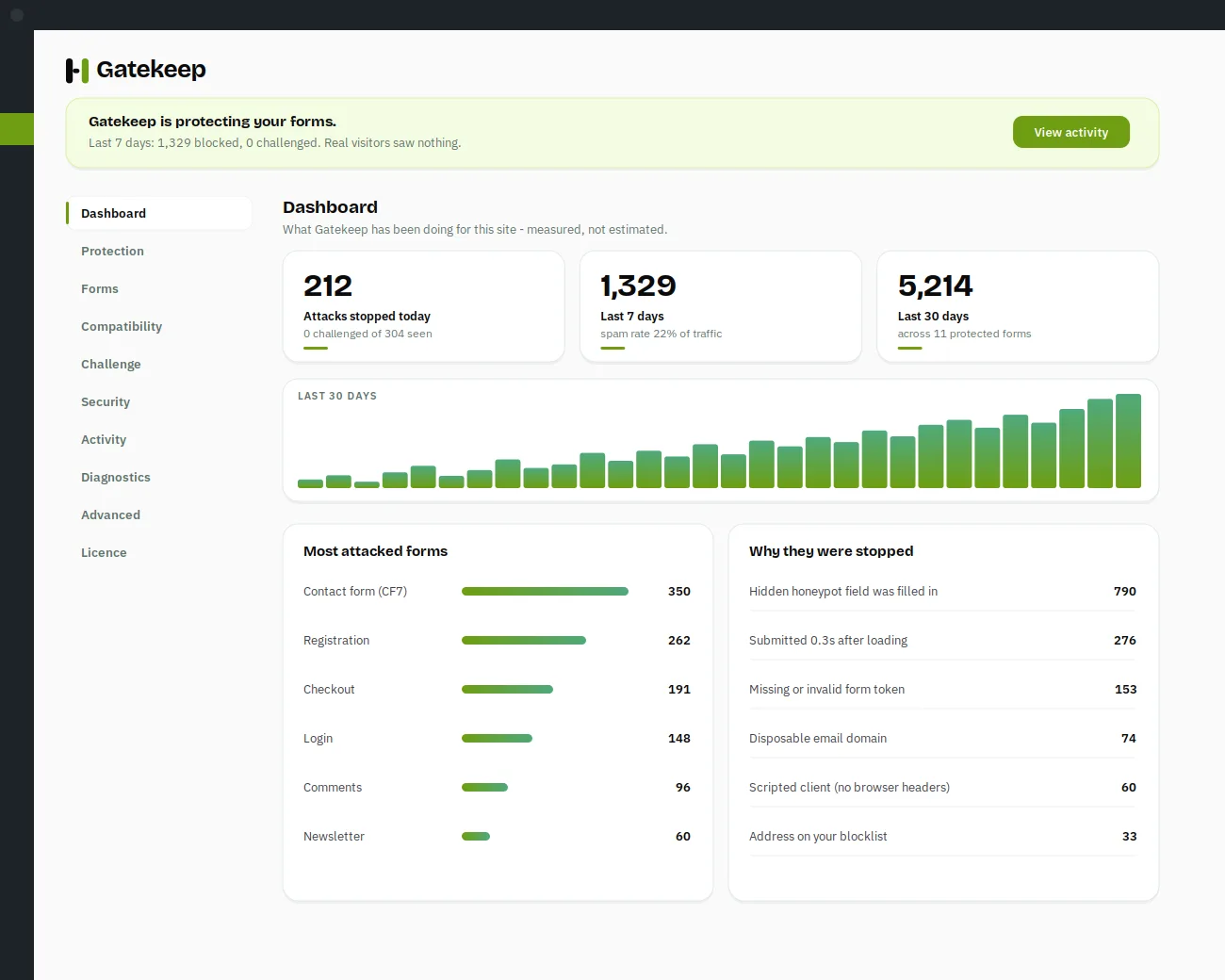
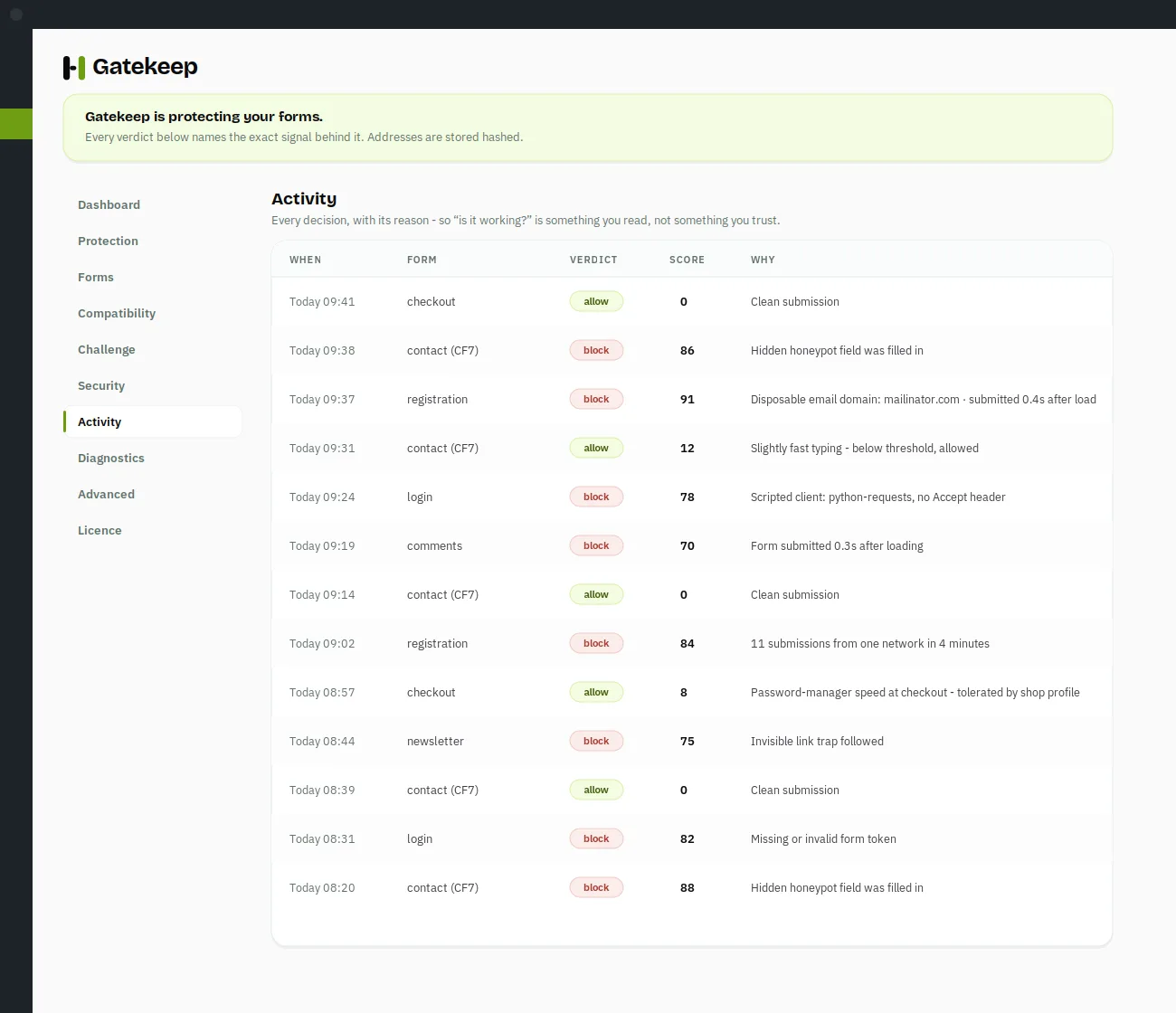
Every Gatekeep decision is recorded with the form it came from, the score, and the specific signal that caused it — written as a sentence. If something is caught wrongly, you know which one setting to relax rather than switching the whole thing off.
- "Hidden honeypot field was filled in", not "rule 0x04"
- The most attacked forms and most common reasons, ranked
- Visitor addresses stored hashed, never in the clear
Why not just add a CAPTCHA
The puzzles are already solved
Search GitHub for the tools that defeat them and you will find more active projects than there are captcha services. Working solvers exist for reCAPTCHA v3, for Turnstile, and for image challenges — several updated this month.
That is not an argument for giving up. It is an argument about where the effort belongs. A challenge is one signal, and a determined attacker buys their way past it for pennies. What they cannot cheaply fake is filling in a form the way a person does — at human speed, from a browser that behaves like a browser, without touching the field nobody can see.
So Gatekeep treats a challenge as the last resort rather than the first, and gives you ten other ways of telling before it asks anyone anything.
Side by side
How the approaches differ
This compares approaches rather than named products, because what any given plugin does changes with its version and we would rather not describe someone else's software inaccurately.
| Capability | Gatekeep | A single-purpose spam filter | A CAPTCHA service |
|---|---|---|---|
| Protects more than one form type | Yes | Usually one | Wherever you add it |
| Finds your forms for you | Yes | Manual | Manual |
| Recommends settings for your site | Yes | Rare | Not applicable |
| Works without challenging visitors | Yes | Varies | No, that is the mechanism |
| Explains each decision in plain words | Yes | Varies | A score, unexplained |
| Records before enforcing | Yes | Rare | No |
| Needs an account or API keys | No | Often | Always |
| Sends visitor data to a third party | No | Often | Always |
Questions people ask when comparing
What makes Gatekeep different from other WordPress anti-spam plugins?
Do I still need reCAPTCHA if I use Gatekeep?
Can I change the recommended settings?
Does Gatekeep replace a security plugin like Wordfence?
There is a better way to protect WordPress forms
Install it, let it look at your site, and judge the recommendation for yourself.
- Free forever
- No account needed
- Nothing to configure
A different layer of security
Keep your firewall. This is the part it was never watching.
That moment is where spam becomes a fake lead, a fake account, a fake order, a password-reset attack, or one more notification you did not need. Every other tool in your stack is looking somewhere else when it happens.
Honestly compared
Why not just keep the CAPTCHA you have?
Because it is charging your customers for your spam problem. Here is the difference, stated plainly enough to check.
| What matters | Gatekeep | The usual approach |
|---|---|---|
| Puzzles for your visitors | None. Ever. | reCAPTCHA and hCaptcha ask every visitor to prove themselves |
| Forms covered | All of them - 33 integrations | Akismet covers comments; most others cover one form plugin |
| Where decisions happen | Your own server | Sent to a third party with your visitors' addresses attached |
| Setup | Activate. Done. | Create an account, generate keys, paste them, test, repeat per site |
| When it gets one wrong | Shows its arithmetic and lets you fix it in a click | A score you cannot question and cannot explain to the customer |
| If you stop paying | Your sites keep working, settings intact | Protection switches off and the spam returns that afternoon |
The free plan
Free means free. Not "free until you need it".
No crippled demo. No seven-day trial. No feature you discover is locked at the moment it matters. Install it, let it read your site, turn protection on, watch what it catches - all of that is the free plugin, permanently.
What a licence buys is not permission to use the engine. It buys the parts that need doing again every week: threat intelligence refreshed daily from live abuse, integrations maintained as those plugins change, and the modules that arrive by auto-update.
Code is written once. Threats are not.
Proof, not adjectives
Everything here can be checked
You will not find invented five-star reviews on this page. Gatekeep is new, and pretending otherwise would be the first thing we lied to you about. What you can do instead is install the free version, leave it in Monitor Mode for a week, and read what it caught. That is a better reference than a stranger's testimonial.
Your next spam submission is already on its way
Do not make your customers solve another puzzle to stop it. Install Gatekeep, let it inspect your site, see what it finds - then decide whether it blocks anything at all. If it is not doing what this page says, delete it; you have lost two minutes.
Two-minute setup - no account - no card - no API key - GPL licensed