Skip to content
Home PricingFree forever, paid adds live intelligence Akismet alternative reCAPTCHA alternative All comparisons IntegrationsAll 33, and how each one is protected WooCommerce protection Contact Form 7 Elementor Documentation Sign in

Every feature exists to remove one thing you are currently doing by hand

Deleting fake enquiries. Explaining to a customer why the form would not send. Wiring API keys into a fourth site. Wondering whether the thing you installed is actually doing anything. Each feature below exists because one of those is a bad way to spend a Tuesday.

One platform

Count your forms. Now count the protected ones.

Each of these gets abused in its own way - fake accounts here, card testing there, link spam somewhere else. Protecting them one plugin at a time is how the gaps appear. Gatekeep covers the lot from one screen.

covered
  • Contact forms
  • Login pages
  • Registration
  • WooCommerce checkout
  • Password reset
  • Comments
  • Membership portals
  • Course enrolment
  • Newsletter sign-up
  • Custom forms

Detection

It reads your site before it asks you anything

Most security plugins open on a settings screen and expect you to already know which of forty switches matters for your site.

Gatekeep looks first. On activation it finds your form plugins, page builders, shop, community software, and the WordPress forms you did not think about, and shows you the list.

You start by confirming it understood your site, rather than by configuring something you cannot yet evaluate.

  • Detects 33 integrations across form plugins and builders
  • Anything installed later stays off until you switch it on
  • Reports competing anti-spam plugins so two do not fight

Recommendation

Expert defaults, with the reasoning shown

A shop and a membership community face different threats, but most plugins ship one set of defaults for both.

Gatekeep suggests a protection profile based on what it actually found, and tells you what led it there — naming the plugins, not the category.

You can judge the recommendation instead of trusting it, and disagree with it in one click.

  • Five profiles: standard, strict, shop, membership, developer
  • A shop profile that puts nothing visible in front of a buyer
  • Editing any setting marks the profile custom rather than lying to you

Invisible protection

Keep bots out, let people through

CAPTCHAs tax every visitor to catch a few, and modern bots solve them anyway. The people who suffer most are the ones about to buy from you.

Gatekeep scores each submission on forty-one signals in total — how it was filled in, how fast, from where, how often, and what it contains — and only asks for verification if you have configured one.

Real visitors finish your forms without noticing anything happened.

  • No CAPTCHA by default, and no JavaScript required
  • Signals combine so several weak ones cannot add up to a block
  • Works behind full-page caching — tokens are signed, not stored in a session

Human-written spam

It reads what was sent, not just how

The spam that hurts most is typed by a person: a sales pitch sent at human speed from a real browser. Every check that measures how a form was filled in passes it, and so does every CAPTCHA.

Gatekeep recognises the shape of cold outreach - a service offered as a pitch about your website, a request for a call, an opt-out line - and judges where every link in a message goes.

The "I came across your website" emails stop reaching your inbox, while your own customers can still ask you about anything.

  • A topic alone never counts - only a topic written as a pitch
  • Link shorteners, bare IP addresses, downloads, redirects and look-alike names
  • Checked on your server; nothing is looked up anywhere else

Learning

It learns what spam looks like on your site

A bakery and an SEO agency get very different mail. No word list shipped with a plugin can know which is which on yours.

Mark any submission Spam or Not spam in the Activity log. Gatekeep learns its wording, the sites it promoted and the sender, and recognises them next time - in any language.

The spam that got past it once is the spam it catches next time.

  • Words are stored only as one-way hashes, never as readable text
  • A site you mark Not spam is never held against anyone again
  • Every mark can be undone, so a mis-click is never baked in

Email intelligence

Throwaway inboxes, including the ones nobody has listed

New throwaway email domains are registered every day precisely so they are on no list yet.

Beyond its list of disposable domains, Gatekeep catches new ones by their name, by mailbox names that look generated, by senders you have marked as spam and - when DNS checks are on - by the mail servers that run throwaway inboxes.

Fake sign-ups and throwaway enquiries stop slipping through the gap between a new domain and the next list update.

  • Remembers the mail servers behind known throwaway domains
  • Free-mail addresses are never treated as a spammer's own domain
  • DNS lookups use your own server and are cached

CAPTCHA, when you want one

Every CAPTCHA, shown only to the doubtful few

CAPTCHA plugins pick one provider, and many charge for the rest. Switching means finding your keys all over again.

Five built-in CAPTCHAs that need no keys, plus reCAPTCHA v2 and v3, hCaptcha, Cloudflare Turnstile and Friendly Captcha. Gatekeep finds the keys another plugin already stores on your site and uses them in one click.

You can switch in a minute, keep the provider you trust, and most visitors still see nothing at all.

  • Imports keys from CAPTCHA 4WP, Advanced Google reCAPTCHA, BestWebSoft, Simple Cloudflare Turnstile, hCaptcha for WP, Contact Form 7, WPForms, Forminator and more
  • Adaptive proof-of-work: harder for repeat offenders and during attacks, easier for known visitors
  • The other plugin is left exactly as it was until you switch it off

Monitor Mode

Protection from minute one, judgement you can check

The real fear when installing a security plugin is not spam getting through. It is a paying customer being turned away and never telling you.

Attacks nobody could mistake for a visitor — a hidden field filled in, an invisible link followed, an address you blocked — are stopped immediately. Genuinely borderline submissions are recorded and let through so you can read the reasoning first.

You are protected straight away and still get to check the judgement before it starts refusing anyone.

  • Conclusive attacks blocked from the first request
  • Borderline cases logged with the signal that flagged them
  • One click to turn full enforcement on when you are satisfied

Activity

Every decision explained in plain words

Security plugins tend to be black boxes. You cannot tell whether they are working, and when something goes wrong you cannot tell why.

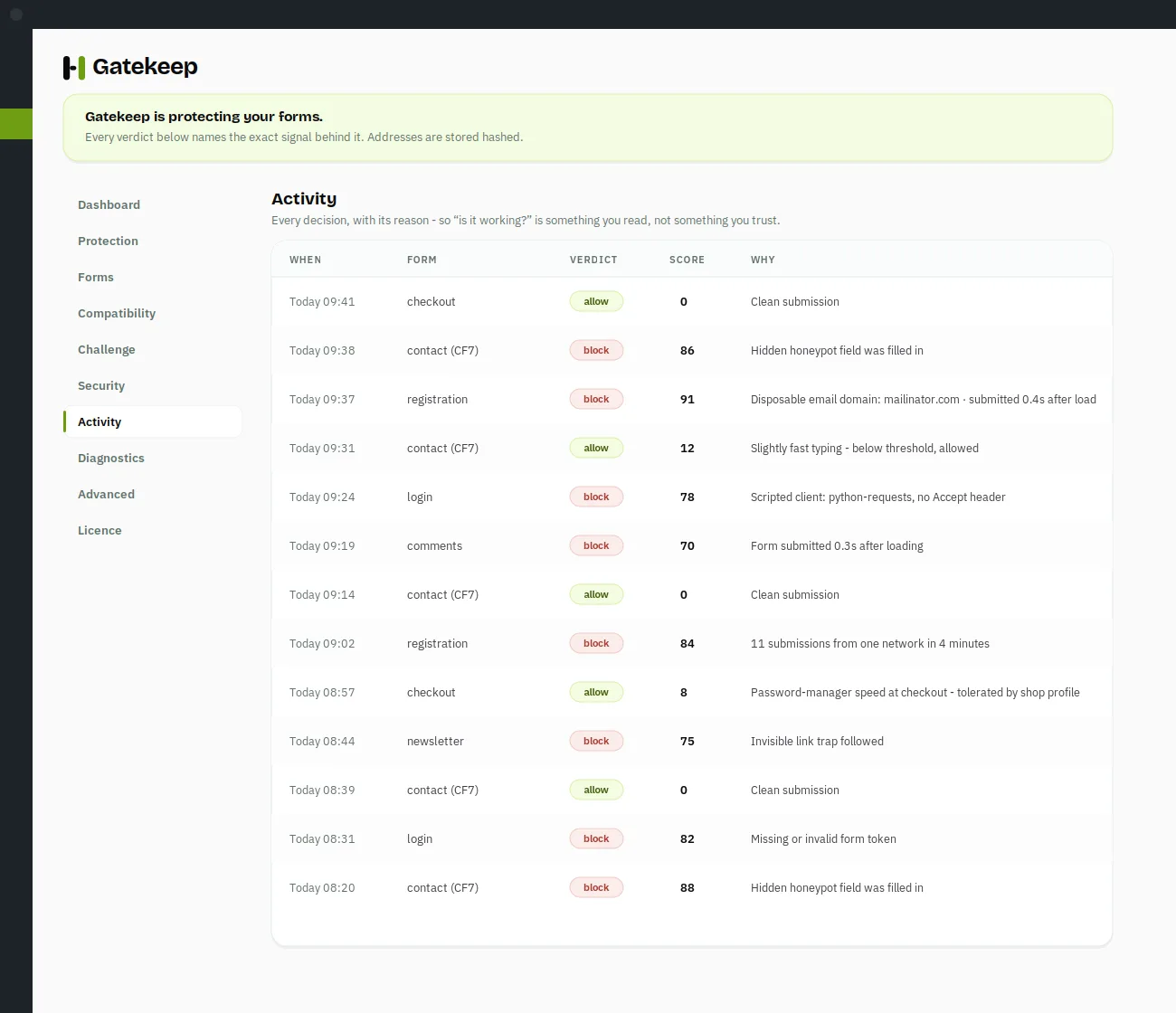
Every verdict is recorded with the form it came from, the score and the signals that decided it — written as sentences rather than codes. "Why this verdict" shows what each signal means, how many points it added, how they combined, and what to do if it was wrong.

When something is caught wrongly you know which single setting to relax, instead of switching the whole thing off.

  • "Hidden honeypot field was filled in" — not "signal 0x04"
  • The score worked out in front of you, with the thresholds it crossed
  • Visitor addresses stored hashed, never in the clear

Security score

A number you can actually act on

A score with no explanation is not information, it is anxiety. Most tools give you a figure and leave you to guess.

Gatekeep scores coverage and configuration out of 100, then lists the specific fixes available and how many points each one is worth.

You can see what to do next, in order of what it is worth doing.

  • Every point traces back to a named check
  • A 20-check security audit sits behind it
  • Nothing is changed automatically — auto-fixers are how sites break at 2am

Compatibility

It survives the plugin updates it depends on

Integrations break silently. A form plugin changes its hooks in a major release and your protection quietly stops running — usually without telling anyone.

Gatekeep watches real submissions. If one arrives carrying a plugin's fingerprint but no adapter ran, that is a miss. After five it marks the adapter degraded, switches on generic protection so those forms are not left bare, and emails you.

A builder update does not quietly leave a form unprotected for six months.

  • Divi 4 and 5 supported without version sniffing
  • Recovers automatically once the adapter works again
  • Every callback is contained, so a failure of ours cannot break someone else's form

Performance

Light enough to leave on everything

Security plugins are notorious for the weight they add, and the ones that protect forms often load on every page whether or not there is a form on it.

Gatekeep adds about 380 bytes to a protected form and no JavaScript by default. The licence client, the update checker, the hardening module and the entire admin interface are never loaded for a visitor.

You do not have to weigh protection against page speed.

  • About 111 KB of the plugin parsed on a page view, of 298 KB total
  • The 75,000-domain threat list lives in an indexed table, never in memory
  • No jQuery, no framework, no external requests on the free tier

Support

It diagnoses itself before you write to anyone

"My form stopped working" is the hardest message to answer, because the cause could be this plugin, your form plugin, your cache or your host.

A built-in self-test runs 35 checks and says what is wrong and what to do about it — including whether each form plugin is genuinely attached, rather than just installed.

Most problems answer themselves, and the ones that do not come with a report you can paste into an email.

  • Catches a missing table, stalled cron, or a challenge your server cannot draw
  • The report leaves out licence keys, provider secrets and your address lists
  • Two escape hatches in wp-config if you are ever locked out

The difference

A narrow job, done properly

Firewalls guard the door. Malware scanners search the house. Neither watches the one place your business actually happens: the moment a stranger types into your form and presses send. That moment is all Gatekeep does, and it does it better than a tool doing nine other things.

Keep your firewall. This is the part it was never watching.

The Gatekeep activity log showing blocked submissions with the signal that caught each one, in plain language.
Every decision is listed with the reason. Nothing is a black box.

Questions about the features

Do I need to configure anything before Gatekeep starts working?
No. Gatekeep detects your form plugins and page builders on activation, recommends a protection profile based on what it found, and applies it in one click. Obvious attacks are stopped from the first request.
Which WordPress form plugins does Gatekeep support?
Thirty-three integrations, including Contact Form 7, Gravity Forms, WPForms, Fluent Forms, Formidable, Ninja Forms, WooCommerce, bbPress and BuddyPress, plus Divi, Elementor, Bricks, Avada, Thrive, WPBakery, Oxygen, Beaver Builder and SeedProd. WordPress login, registration, password reset and comments are covered too.
Does Gatekeep work without reCAPTCHA?
Yes. Gatekeep scores each submission using layered signals rather than challenging every visitor, so no CAPTCHA is needed. If you already use reCAPTCHA, hCaptcha, Turnstile or Friendly Captcha, Gatekeep can use those instead.
How much does Gatekeep slow a WordPress site down?
It adds about 380 bytes to a protected form and loads no JavaScript by default. A front-end page view parses roughly 111 KB of the plugin; the licence client, update checker and admin interface are not loaded for visitors.
What happens if Gatekeep blocks a real customer?
The activity log names the exact signal that caught them, so you relax that one setting rather than switching off the protection. An address allowlist is available if you need someone through immediately.

Protect every form without adding friction

Install Gatekeep, let it look at your site, and see what it finds.

  • Free forever
  • No account needed
  • Nothing to configure

What you get

Six problems, gone

Invisible checks

Nobody is ever asked to prove they are human

Gatekeep reads signals the visitor never notices: whether a hidden field was touched, how long the form took, whether the request even carries a browser's fingerprints. Every puzzle you remove is a customer who finishes the form - and the studies on abandonment are not subtle. Your enquiry rate goes up while your spam goes down, which is the opposite of what a CAPTCHA does to you.

Every form, found automatically

The forms you forgot about are the ones being abused

Your contact form is probably covered. Your registration, checkout, comments, password reset and that newsletter box in the footer probably are not - and those are the doors bots actually use to make accounts, test stolen cards and post links. Gatekeep detects 33 form and builder integrations on activation and covers them all from one screen. Nothing to wire up per form, ever.

Monitor Mode

See exactly what it would block before it blocks anything

Switching on a security plugin usually means holding your breath and hoping no real customer gets caught. Gatekeep starts by watching: it records every decision it would have made, in plain sentences, and you turn enforcement up when the log has convinced you. You are never guessing whether it is safe - you are reading the evidence first.

Explained verdicts

When a customer says the form would not send, you get an answer

Every decision shows its arithmetic: which signals fired, what each one added, what the total was. No score between nought and one from a black box in California. You can tell that customer exactly what happened, fix it in one click, and get on with your day.

Your server, your data

No account, no API keys, nothing sent to anyone

The free plugin makes every decision inside your own WordPress. There is no third party receiving your visitors' addresses, no key to generate, no dashboard elsewhere to log into, and nothing to explain in your privacy policy beyond what you already say. Activate it and it is working - two minutes, no configuration.

Built for real traffic

Fast enough that you will never think about it again

A page view costs about a tenth of a millisecond and touches your database not at all; the work only happens when something is actually submitted. Housekeeping runs in bounded batches so a big activity log can never lock a table. This is measured on every release, not assumed.

A different layer of security

Keep your firewall. This is the part it was never watching.

A firewallguards the door
A malware scannersearches the house
File integrityinspects what changed
Gatekeepwatches the moment someone types into your form and presses send

That moment is where spam becomes a fake lead, a fake account, a fake order, a password-reset attack, or one more notification you did not need. Every other tool in your stack is looking somewhere else when it happens.

Your next spam submission is already on its way

Do not make your customers solve another puzzle to stop it. Install Gatekeep, let it inspect your site, see what it finds - then decide whether it blocks anything at all. If it is not doing what this page says, delete it; you have lost two minutes.

Two-minute setup - no account - no card - no API key - GPL licensed